

Understanding Pending Incoming Proposals
When one of your books receives at least one active incoming proposal, Pasaj displays an indicator at the top of that specific book card. This indicator shows the number of pending proposals waiting for your decision.
Also, you will see a badge on the My Books icon 
 in the bottom navigation bar when there are at least one or more active incoming proposals for your books.
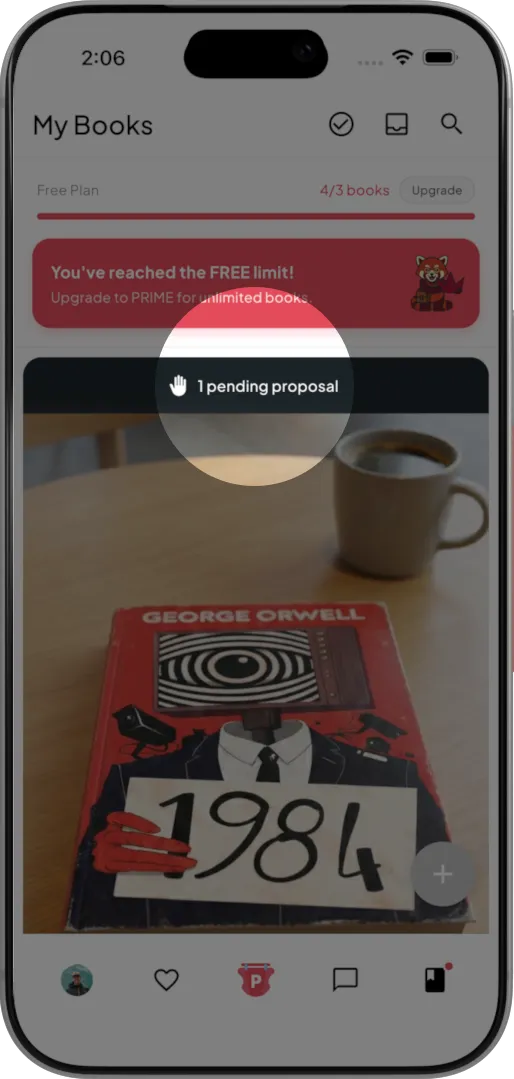
Although both incoming and outgoing proposals are listed together on the Active Proposals page, the counter displayed on each book only reflects active incoming proposals. In other words, it counts proposals that require your approval or rejection. Outgoing proposals you have sent to others are not included in this number.
This distinction ensures you can clearly identify which books require your action in a book exchange process.
Why This Filter Is Useful
If you have many books listed in My Books, identifying which ones have active incoming proposals can become time-consuming. When you actively swap books nearby or exchange books nearby with multiple users, your library may grow significantly.
To help you stay organized, Pasaj provides a dedicated filter that shows only the books with pending incoming proposals. This allows you to focus on decisions that directly impact your ongoing book swap activity.
How to Filter Books with Pending Incoming Proposals
- Go to the My Books

 page.
page. - Locate the Inbox

 icon in the top bar and tap it.
Pasaj will automatically filter your books and display only those with at least one active incoming proposal.
After activating this filter, a banner will appear at the top of the My Books feed stating:
Only books with pending proposals are shown
A Reset button will be visible next to this message.
How to Reset the Filter
If you want to view all your books again:
- Tap the Reset button in the banner.
The filter will be removed, and the full list of your books will be displayed again.
Using this feature helps you quickly identify where action is required, making it easier to manage proposals, find books nearby, and maintain an efficient book exchange workflow.
Need Help?
If you need further assistance, have additional questions, or want to share feedback or a product idea, please join us in live chat right now by tapping the button in the bottom right corner of this page.
Frequently Asked Questions
What are pending incoming proposals in Pasaj?
Pending incoming proposals are active swap proposals sent by other users for your books that require your approval or rejection.
How do I know if one of my books has pending incoming proposals?
Pasaj displays an indicator at the top of the specific book card showing the number of active incoming proposals waiting for your decision.
What does the badge on the My Books icon mean?
A badge appears on the My Books icon in the bottom navigation bar when there is at least one active incoming proposal for your books.
Does the proposal counter include outgoing proposals I sent?
No. The counter on each book reflects only active incoming proposals that require your action. Outgoing proposals you sent to others are not included.
Why are outgoing proposals not counted in the book indicator?
The counter is designed to highlight proposals that require your approval or rejection, ensuring you can clearly identify where action is needed.
Where can I see both incoming and outgoing proposals together?
Both incoming and outgoing proposals are listed together on the Active Proposals page.
How can I filter only books with pending incoming proposals?
Go to the My Books page and tap the Inbox icon in the top bar. Pasaj will automatically display only books with at least one active incoming proposal.
What happens after I tap the Inbox icon in My Books?
Your books will be filtered to show only those with pending incoming proposals.
Is there any visual confirmation that the filter is active?
Yes. A banner appears at the top of the My Books feed stating “Only books with pending proposals are shown,” along with a Reset button.
How do I remove the pending proposals filter?
Tap the Reset button in the banner to remove the filter and return to viewing all your books.
Why should I use the filter for pending incoming proposals?
The filter helps you quickly focus on books that require your decision, making it easier to manage ongoing book swap activity.
Is this filter useful if I have many books listed?
Yes. If your library grows or you actively exchange books nearby with multiple users, the filter helps you stay organized and avoid missing proposals.
Does activating the filter affect my proposals?
No. The filter only changes what is displayed in My Books and does not modify any proposals.
Can I still access books without pending proposals while the filter is active?
No. While the filter is active, only books with at least one active incoming proposal are shown.
Does the filter automatically update when new incoming proposals arrive?
If there is at least one active incoming proposal, the badge and indicators will reflect that, allowing you to use the filter to view relevant books.
What is the main purpose of filtering books with pending incoming proposals?
It allows you to quickly identify which books require your action, helping you manage book swap requests efficiently and maintain a smooth book exchange workflow.